SQL Server存储过程实现数据插入更新详解


我们知道,存储过程的功能是非常强大的,而且可以简化一些操作,从而提高SQL性能。本文我们就介绍了SQL Server 2008数据库利用存储过程来实现插入更新数据的实例,通过这个实例让我们来一起了解一下存储过程的庞大功能吧。
1、数据库表结构
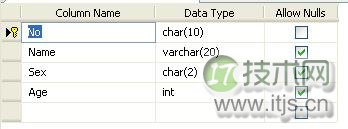
2、创建存储过程
(1)实现功能:
1)有相同的数据,直接返回(返回值:0);
2)有主键相同,但是数据不同的数据,进行更新处理(返回值:2);
3)没有数据,进行插入数据处理(返回值:1)。
根据不同的情况设置存储过程的返回值,调用存储过程的时候,根据不同的返回值,进行相关的处理。
(2)下面编码只是实现的基本的功能,具体的SQL代码如下:
Create proc sp_Insert_Student @No char(10), @Name varchar(20), @Sex char(2), @Age int, @rtn int output as declare @tmpName varchar(20), @tmpSex char(2), @tmpAge int if exists(select * from Student where No=@No) begin select @tmpName=Name,@tmpSex=Sex,@tmpAge=Age from Student where No=@No if ((@tmpName=@Name) and (@tmpSex=@Sex) and (@tmpAge=@Age)) begin set @rtn=0 --有相同的数据,直接返回值 end else begin update Student set Name=@Name,Sex=@Sex,Age=@Age where No=@No set @rtn=2 --有主键相同的数据,进行更新处理 end end else begin insert into Student values(@No,@Name,@Sex,@Age) set @rtn=1 --没有相同的数据,进行插入处理 end
3、调用存储过程
这里在SQL Server环境中简单的实现了调用,在程序中调用也很方便。
具体的代码如下:
declare @rtn int exec sp_Insert_Student '1101','张三','男',23,@rtn output if @rtn=0 print '已经存在相同的。' else if @rtn=1 print '插入成功。' else print '更新成功'
以上就是SQL Server 2008数据库使用存储过程来实现插入更新数据的实例的全部过程,本文就介绍到这里了,假如您想了解更多SQL Server数据库的知识,不妨看一下这里的文章:http://database.51cto.com/sqlserver/,相信一定可以给您带来收获的!